Choose a run with a concrete goal
- Open Objectives in the universe you plan to play. Read whether progress is cumulative or must happen in one run.
- For an early survival milestone, choose a character you already control reliably. The pictured 40K objective lists surviving one minute as the Tape Measure unlock.
- For a rescue goal, choose the named stage. Catachan needs an Imperial Bastion rescue.
- After the attempt, check completion and available rewards before repeating it.
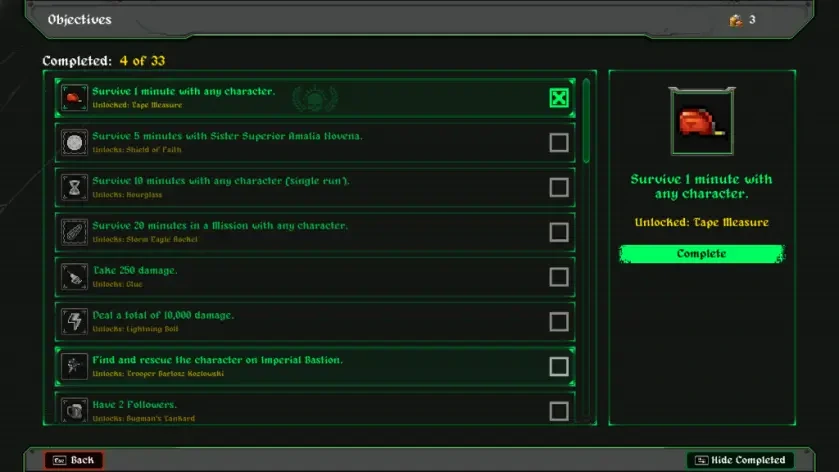
Objectives screenshot by Destructoid, from its launch item guide ↗ (opens in a new tab). Use your installed build’s wording when it differs.
Check unlocks before planning an evolution
Choose one target pair in the evolution finder and filter the universe. If its passive is locked, make that unlock your immediate goal. For Dice Cube, follow the universe-specific objective. Once both items are available, follow the weapon-upgrade and chest checks in the recipe guide.
For a follower goal, the two-follower route explains the required weapons and prerequisites. Followers supply attacks during a solo run. For human player count, see co-op status.
Check the platform before applying a fix
Steam hotfix v2.1.6 makes chest sequences skippable with any button and fixes unreachable chest drops on Imperial Bastion and Gallowdark. Its 11 November announcement schedules other platforms from the following week. Developer patch notes ↗ (opens in a new tab)
Keep your platform and installed version with a bug report. These planning tips combine documented objectives and existing guides, with no site-run performance or build-ranking test. Check Switch 2 access and controls or Secrets menu access for your next task.