
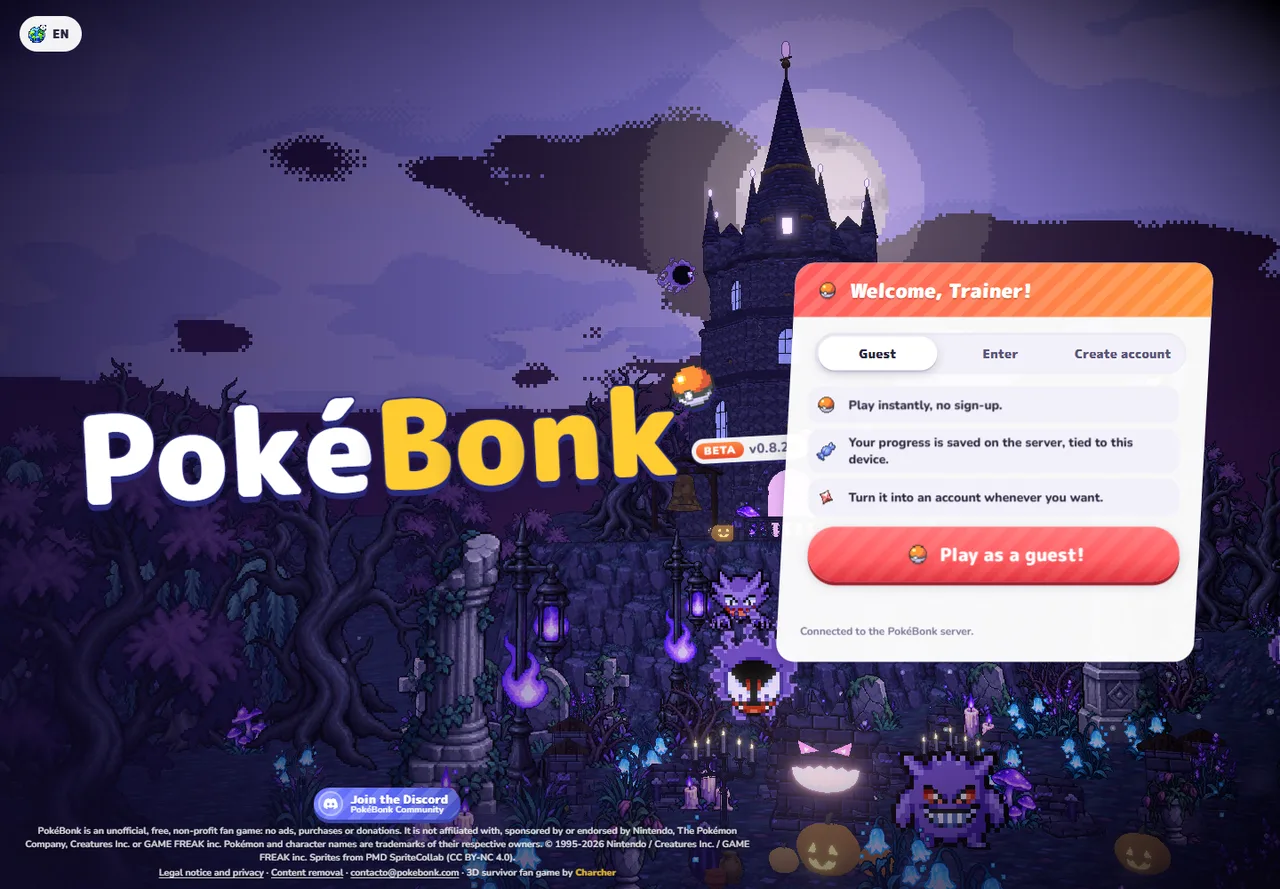
Start at the original game
Go to pokebonk.com — original game ↗ (external website, opens in a new tab). The entry screen offers Guest, Enter and Create account. Use Enter for an existing named account. The Guest screen says progress is saved on the server and tied to the current device.[1]
- If you already have progress, use that same browser profile first.
- For a new Guest, select Guest and use “Play as a guest!”.
- On a fresh profile, follow the starter selection. On an existing profile, continue into the League through Play.
- Read the chosen partner’s passive and move kit. Confirm the partner, then inspect the available region, mode and difficulty before starting.
The entry screen was inspected on October 23. The later sequence is documented in the public client; this guide does not claim a successful Guest creation or completed run in this review.
Keep the current controls nearby
These are defaults in the v0.8.25 client. Saved rebindings take priority. Open Settings and its Keys section if an action differs; level-up shortcuts are contextual, not ordinary attack keys.[2]
| Action | Current default | When to use it |
|---|---|---|
| Move | W A S D | Move while checking the camera direction. |
| Jump / slide | Space / Left Shift | Separate movement actions; check readiness and terrain. |
| Interact | E | Use the prompt beside a nearby object. |
| Ultimate | R | Activate when ready; Y toggles auto Ultimate. |
| Aim / lock | Q / right mouse | Change aiming mode or target lock. |
| Map / pause | M / P | Inspect the map or pause before reading. |
| Upgrade tools | F / X / Z | Reroll / skip / banish in the level-up context, when available. |
Your equipped moves attack automatically. Movement, camera control, aiming and upgrade decisions still need attention. Use pause to read rather than testing unfamiliar shortcuts in a crowded wave.
Read the first upgrade by what it changes
Level-up choices can add or improve a move or change a stat. Read the full card and the current move slots before confirming. A new move, an upgrade to an existing move and a stat bonus are different decisions in the current client.[2]
- Need recovery? Check whether the offer actually restores HP or changes regeneration; extra damage is a different effect.
- Improving damage? Compare the affected damage class and move type with your current kit.
- Managing movement? Learn what the current mobility option does before replacing a choice that already works for you.
This is a card-reading method, not a tested universal spending order. Available choices and their value depend on the run.
Protect the Guest you already have
The project’s policy says unused Guest accounts are deleted after 60 days. Local browser storage keeps session information; a server-saved run does not mean a different browser automatically has the credentials to access it.[3]
Before clearing site data or switching profiles, inspect the original game’s option to save the existing Guest to an account. Keep your current session until the conversion is confirmed. We have not tested conversion, recovery or the inactivity deadline.
For missing progress, keep the displayed version and error text and use the project’s Discord support ↗ (external website, opens in a new tab). This guide cannot recover or access game accounts.
Before the next run
Do I need to download it?
The original entry is a browser game. No installer is needed for that route.
Is it a Megabonk mod?
It has a separate website, client and account system. Start it through PokeBonk, rather than a Megabonk mod manager.
Which starter should I pick?
Use the role you want to learn: recovery with Bulbasaur, defensive bonuses with Squirtle, or a Fire-focused kit with Charmander. These are passive-based suggestions, not measured win rates.
Sources & verification
- Original game entry ↗ (external website, opens in a new tab) — Entry menus inspected October 23, 2026; Beta v0.8.25. SINGLE_SOURCE.
- Original public game client ↗ (external website, opens in a new tab) — Current menu flow, input defaults and upgrade contexts; build mvjzbutg. Client inspection is not a gameplay benchmark.
- Project legal & privacy notice ↗ (external website, opens in a new tab) — Guest inactivity and browser storage policy, accessed October 23. Policy not retention-tested.