Check your two copies
This checks native online co-op, not cross-save or screen streaming. Results follow poncle's FAQ as checked on 5 November 2026; unlisted store combinations stay unconfirmed. This is a documentation check, not a connection test. Your selections stay on this page and are not saved. [1]
Documented platform pairs
| Two copies | Native online result | Before you start |
|---|---|---|
| Steam ↔ Steam | Supported within the same edition | Current commercial game, one device and copy each. [1] |
| Microsoft Store/Game Pass PC ↔ Xbox Series X|S | Supported within the Xbox ecosystem | PC must be the Microsoft edition; Steam on a Windows PC is a different ecosystem. [1] |
| PS4 ↔ PS5 | Supported within PlayStation | Each player needs their own game/device and any required online subscription. [1] |
| Switch ↔ Switch | Same-platform online route | Use the current supported console edition and its required online service. [1] |
| Steam ↔ console; Xbox ↔ PlayStation; Switch ↔ other ecosystems | Not supported by the reviewed FAQ | Room codes do not override the ecosystem boundary. [1] |
| Epic ↔ Steam or another unlisted storefront pair | Not confirmed by this guide | The FAQ does not explicitly identify this exact pair. Ask the developer before purchasing for that pairing. [1] |
| Android/iOS ↔ remote players | Mobile excluded at online launch in the FAQ | Do not confuse this with documented local mobile co-op. [1][2] |
| Old itch.io demo ↔ current game | No native online demo route | The original v0.2.4 browser demo is a separate, older sample. [3] |
Start a compatible online session
- Launch the current commercial game on each player's own device. First check the two stores above; a code cannot fix incompatible ecosystems.
- Agree on the stage and DLC. The base game is enough for online play; for shared DLC content the FAQ requires every participant to own that pack.
- Choose Online from the main menu. One player hosts; the others join using the displayed room code. Xbox also has platform invites. There is no random public matchmaking.
- Choose from your own unlocked characters. The host's save controls which stages and items are available.
- When the run finishes, each player chooses whether to apply the group's progress to their own save. Check that choice before leaving.
These steps summarize the developer's documentation. We did not run a multiplayer session, check a subscription account or test DLC sharing ourselves. [1]
Same room or Remote Play?
Local co-op uses a shared screen; native online lets players roam independently. The current online FAQ says you cannot combine couch and native online players in one session. Every native-online player needs a separate device and game copy. [1]
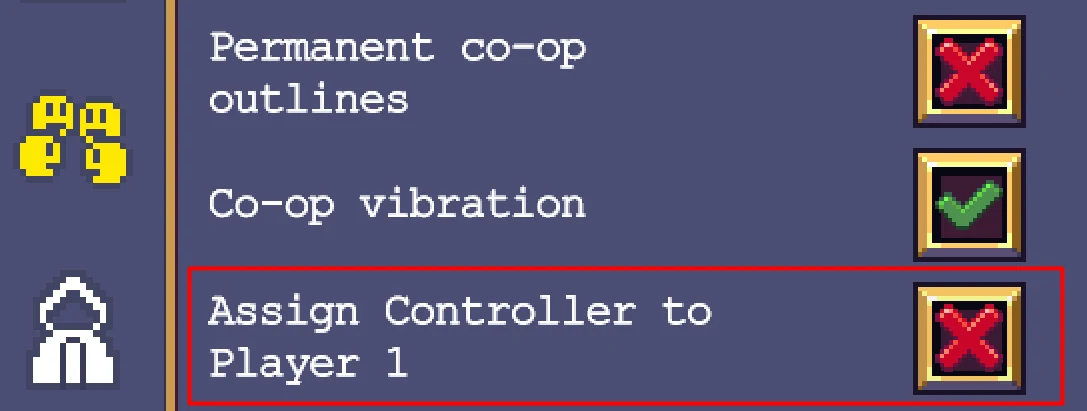
For local PC play, the developer documents one input device per player. If one player uses the keyboard and another a controller, disable Assign Controller to Player 1 in the options. The image above is the developer's local co-op setting, not an Online lobby. [2]
On mobile, the local FAQ describes landscape orientation with Bluetooth controllers for additional players. That does not mean phone-to-PC native online is supported. Steam Remote Play Together is another route: it streams a local session, so treat it as shared-screen play with its own input and streaming limitations. It is not proof of native crossplay. [2][4]
The older local FAQ still contains launch-era wording that online co-op is unavailable. Use it for local inputs; use the separate current online FAQ for native-online availability and ecosystem rules. [1][2]
When a room code does not work
- Compare the exact storefronts, not just the operating systems. “We both play on Windows” does not establish compatibility.
- Check that both players selected the native Online mode rather than a shared-screen streaming session.
- Ask the host whether the run has already started. The FAQ says disconnected clients cannot rejoin a run in progress.
- Check the host connection: the FAQ says losing the host ends the session. A client disconnect is treated differently and the remaining players can continue.
- If the documented compatible setup still fails, record both stores, versions and the exact error before contacting poncle · support email ↗ (external website, opens in a new tab). Do not change or delete saves merely to fix a room code.
These checks separate incompatible setups from issues that need support; they do not promise a fix for every network error. Current rules and disconnect behavior: [1]
Sources & verification
- poncle · online FAQ ↗ (external website, opens in a new tab) — Primary source for current platform ecosystems, player count, device/copy/DLC requirements, room codes and progress. Checked 5 November 2026; no version stamp or multiplayer test.
- poncle · local co-op FAQ ↗ (external website, opens in a new tab) — Local input, controller assignment, mobile landscape and Remote Play guidance. Older page retains obsolete no-online launch wording; not used to override the current online FAQ. Official settings image © poncle; screenshot build/date not supplied.
- poncle · browser demo ↗ (external website, opens in a new tab) — Old demo content and version inspected 5 November 2026; not the commercial online edition.
- Steam · Vampire Survivors ↗ (external website, opens in a new tab) — Lists current co-op and Remote Play Together features; checked 5 November 2026.