
Choose the ASBuilder workflow you need
| Your task | Where to do it | Check before continuing |
|---|---|---|
| Plan cards and jewelry for a run | ASBuilder online · Loadout | Select the class and stage before adding a pick. |
| Plan talents or pre-run equipment | ASBuilder online · Talents / Armory | Compare its tree and item text with your current game. |
| See the next planned pick while playing | ASBuilder addon · /asb | Install the author package in the client you actually use. |
| Keep an ordered Mage or Warlock talent route on this site | Megabonk.org talent planner → | Uses its stated v0.139.2 snapshot and separate share format. |
A new character’s earned points and available equipment still constrain the plan. A public build’s popularity does not establish your current version or progression. [1][2]
Create an ASBuilder plan online
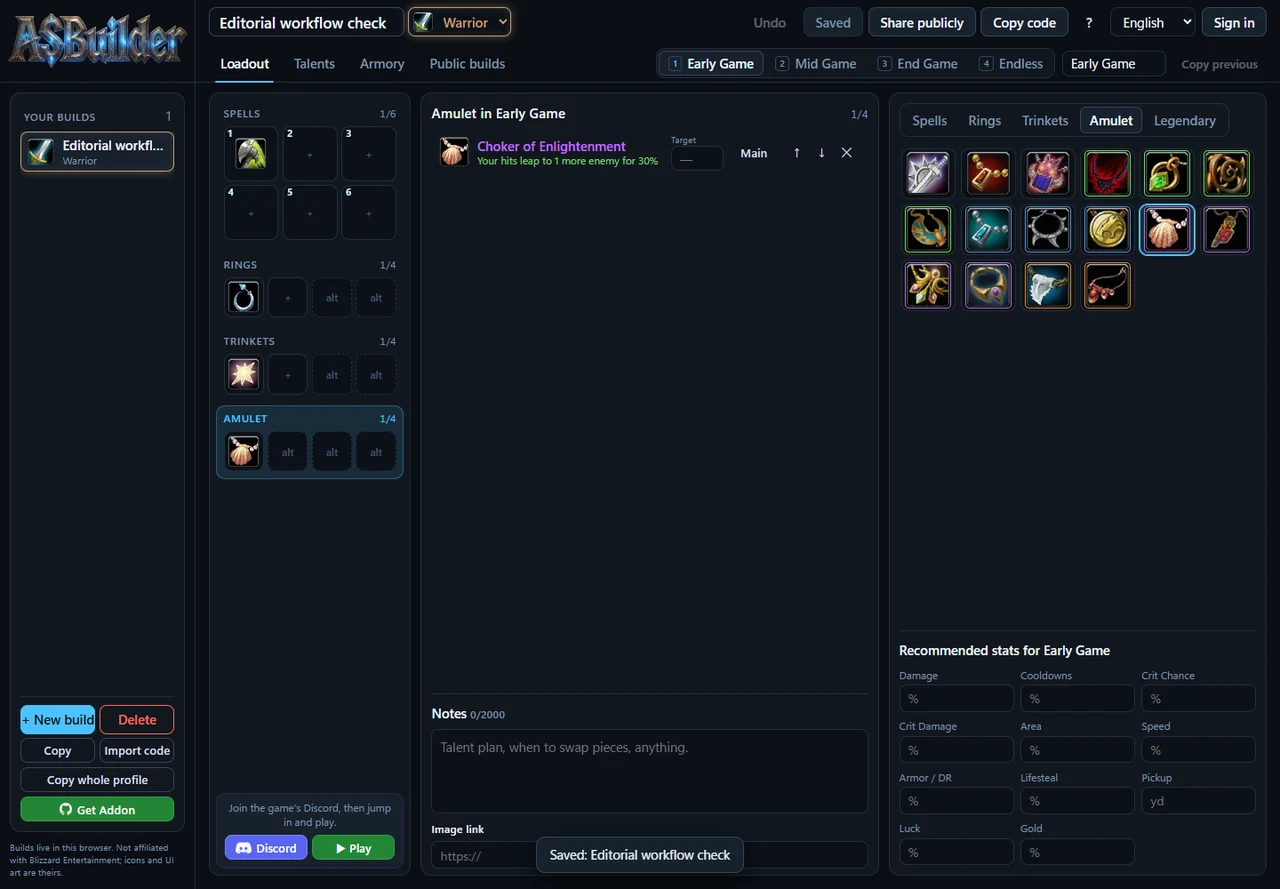
- Open ASBuilds.app. Dismiss the first-use tour with Skip, or follow its four screens. Choose a class and enter a Build name. Use + New build when you want another draft.
- In Loadout, choose Early Game, Mid Game, End Game or Endless. These stage names can be changed. Click a spell icon to add it, set its target rank and move it into priority order.
- Choose Rings, Trinkets and Amulet in the picker. The web layout offers two main rings and two alternatives, two main trinkets and two alternatives, and one main amulet with three alternatives. Alternatives are fallback choices, rather than extra worn slots.
- Move to the next stage. Copy previous carries the earlier picks forward so you can adjust the next targets. Record a reason for changing spells or jewelry in Notes.
- Use Talents to inspect the class tree and Armory for pre-run equipment. Check the corresponding rules in your current game before following the finished plan.
- Click Save after editing. Reload and confirm the intended class, stage and entries remain before closing the tab. Keep an export as a separate backup.
Our 4 November check completed these loadout choices, stage copying, explicit saving and reload recovery in a desktop Chrome session. The same plan was viewed at a 390-pixel mobile width. Talent allocation accuracy, physical-phone input and game-side use were outside this check. [1]
Copy, import and back up a build
- Copy code exports the selected build as an ASB2 code. Keep the complete string together with your game version and a short note about the plan.
- Import code accepts an ASB2 build or an ASBP whole-profile code in the web interface. Our ASB2 check added another build to the list. Inspect the imported class, stages and picks before editing.
- Copy whole profile is the separate backup route for the browser’s collection of plans. A profile import can merge plans, so check the list afterward.
- Share publicly uses a separate account/publication flow. Review notes and image links before choosing publication. We checked local code sharing without creating an account or publishing a build.
The ASB2 round trip was verified between two states of the web planner. Import into the game addon still needs a client-specific check. Game progress is backed up through the game’s own save export →. Our on-site talent planner uses its own link and JSON format. [1][2]
Use the addon with the right client
GitHub · Cadoky’s latest ASBuilder addon ↗ (external website, opens in a new tab) is the author’s download route. The README places the ASBuilder folder inside benilla-config/AddOns/, then restarts the game and opens the planner with /asb or its book button. [2]
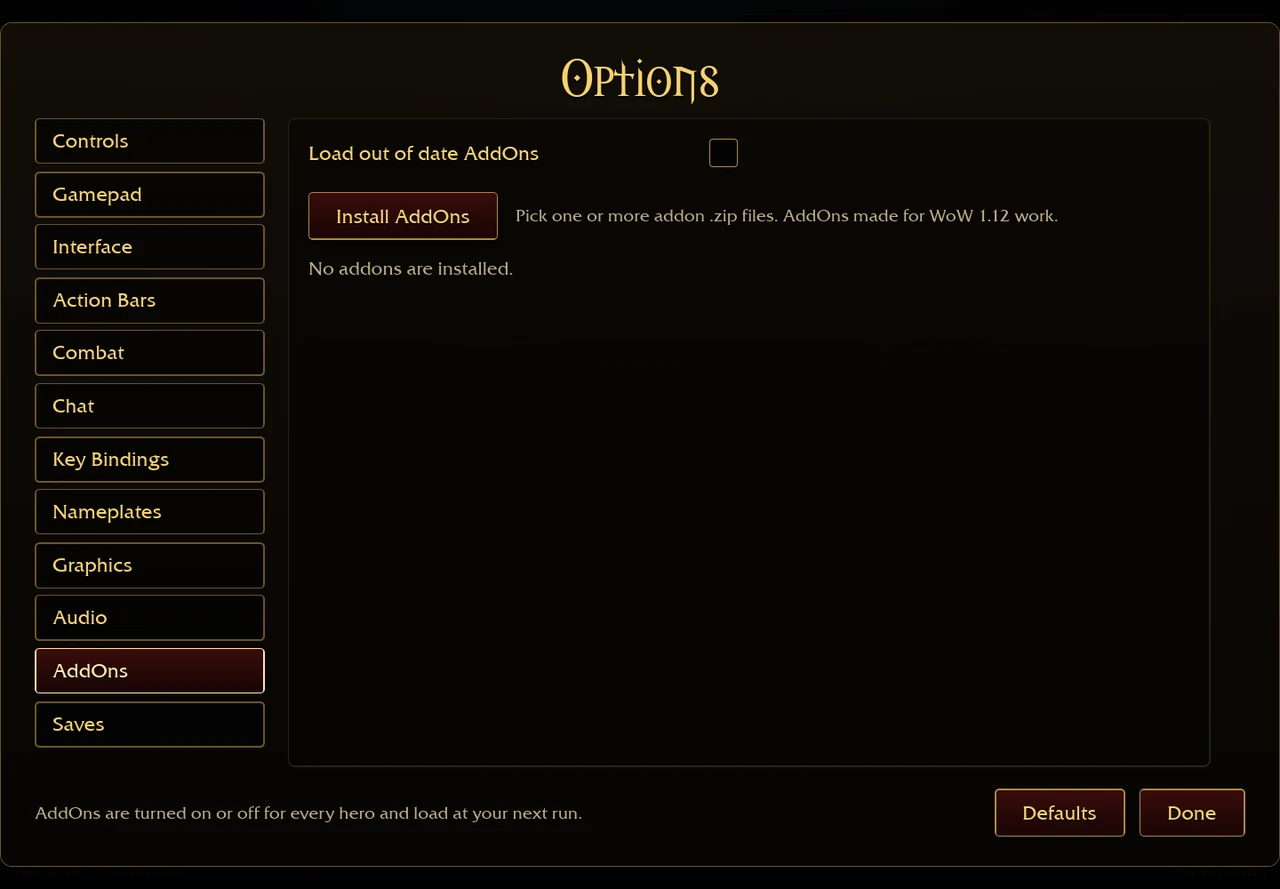
For the browser client, follow Options → AddOns → Install AddOns → and check the package in that client. The original AddOns capture documents that dated interface. We have not installed ASBuilder there or confirmed its current import behaviour.
The author describes an in-run tracker and stage targets. Its README says the addon cannot read game talent data and instead supports a talent screenshot link. The online Talents editor is a separate feature visible on the web tool. [2][1]
Can you create a build inside this page?
ASBuilds.app currently refuses framing by other sites. Its 4 November response sends X-Frame-Options: DENY and CSP frame-ancestors 'none'. An iframe on this page would be blocked by the browser. [1]
Use ASBuilds.app · online planner ↗ (external website, opens in a new tab) in its own tab and keep this guide beside it. For an editable tool on Megabonk.org, open the Mage & Warlock talent planner →. A working ASBuilder embed would require a publisher-supported embedding route or a policy change from its owner.
ASBuilder questions
Do I need the addon to plan online?
The web loadout flow worked without an addon installation or account in our check. The addon is the route for displaying the plan during a game run. [1][2]
Where are my private plans saved?
The web interface stores plans in the current browser. Use its Save and export controls before clearing site data or changing device. Public sharing is a separate action. [1]
Does a code prove that the build works on the latest patch?
A successful import confirms that the planner could read the code. Check talents, spell effects and item previews against the current game before applying it. Check our original-client version record → · Match the jewelry name and icon →[1]
Sources & verification
- Cadoky · ASBuilder online ↗ (external website, opens in a new tab) — Read and interacted with on 4 November 2026. A local Warrior plan was created with Cleave, Quick Strike Ring, Mark of the Chosen and Choker of Enlightenment. Stage copying, explicit Save, reload persistence and ASB2 export/import back into the web tool passed. Talents and Armory views were inspected. No public build was posted, account created, addon installed or game save imported. The response sets X-Frame-Options DENY and CSP frame-ancestors none. Public sprite v=0134 supplies the manually reviewed name/icon pairs; this does not verify current gameplay values or grant an open artwork licence.
- Cadoky · ASBuilder addon project ↗ (external website, opens in a new tab) — Author README read 4 November 2026. Documents spell targets, jewelry alternatives, stages, ASB2 sharing, /asb and the benilla-config/AddOns desktop folder. Card-screen panels are described for game 0.126.0+. The addon cannot read game talent data and offers a screenshot link. Documentation review only; no installation or in-game code-import test.
- Aethus · original browser game ↗ — Captured 30 October 2026, English original v0.130.0 (e7d9dd47). Menu inspection only; the guide’s earlier v0.127.0 mechanics were not re-tested.