
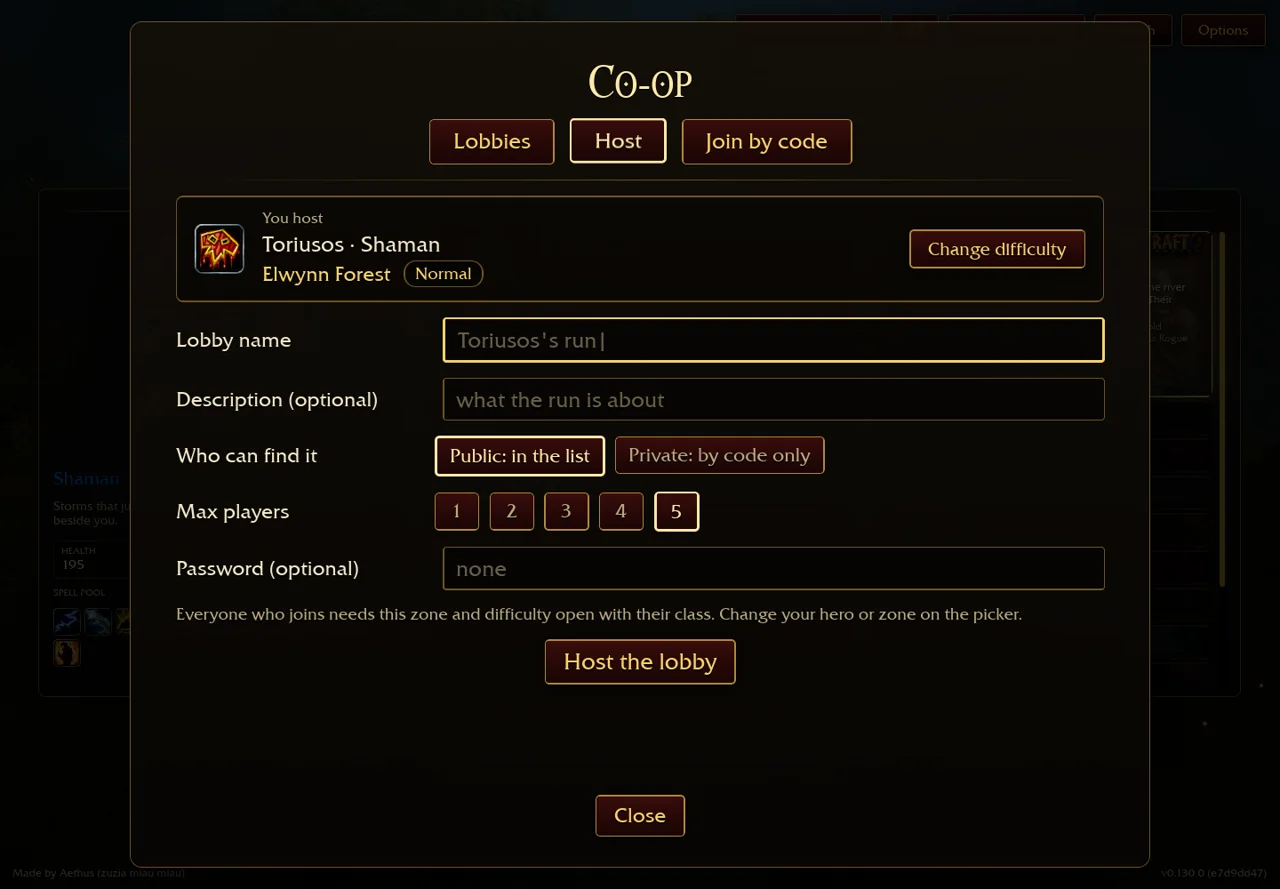
Host or join, in order
- Open the original wow.aethus.pl directly; choose the hero and zone you intend to use.
- Open Co-op → Host. Enter an allowed lobby name; choose public discovery or private code-only access, player limit and an optional password.
- Send friends the code and password yourself. Joining players bring the hero selected on their own picker.
- For a public room, inspect the zone, no-password and unlocked-zone filters. An empty filtered list does not prove that the service is offline.
- When everyone has arrived, the host closes the window and enters the zone. The current client requires at least two players for a co-op run.
We inspected the lobby and Host panels but did not create a public room or complete a multiplayer session. Browser menu evidence does not establish parity with an older Windows archive.[1]
Match the refusal to the next check
| Problem | Next check |
|---|---|
| Different version | Compare each player’s displayed game build; a similar download name does not prove matching versions. |
| Locked zone or difficulty | Check the selected class’s zone progress and the room’s difficulty. A lobby code does not bypass progression requirements. |
| Wrong password / no room with code | Recheck the supplied code and password with the host. |
| Full room / run already started | Ask the host to confirm capacity and run state. |
| Service or relay unreachable | Record the exact error and try the original host later; do not clear your save to fix a relay problem. |
These branches interpret actual client messages. They are not a guarantee that reconnecting or reloading repairs every connection.[1]
Downed friends, reconnects and chat
The game instructs a living friend to stand beside a downed player to revive them; progress messages indicate who is bringing them back. Withering difficulty changes make revives slower and weaker, so do not assume one universal revive duration. Client text distinguishes a disconnected host, a disconnected player and a restored connection. Reconnection messages are not evidence of host migration or recovery after every party ends. Party chat is present in current text. We have not tested message delivery, shared loot/XP rules or a full revive cycle; those remain outside this workflow.[1]
Sources & verification
- Aethus · original v0.130.0 ↗ (external website, opens in a new tab) — English menus and public client text inspected 30 October 2026, build e7d9dd47, resource stamp 98f593b6313e. Single primary source; no full-run, multiplayer or hardware benchmark. Runtime placeholders are not inferred.