
Choose browser or the correct app package
| Your platform | Route | Before you commit |
|---|---|---|
| Desktop browser | Use the original-host game window, or open the original in its own tab | Keep the same host and browser profile for returning progress |
| Windows x64 | Author's .exe setup or .msi on GitHub releases | These are unsigned packages; this guide is not a security audit |
| macOS | Author's universal .dmg | Package signing and compatibility are the author's responsibility |
| Linux | AppImage, .deb or .rpm matching your system | Use the format appropriate to your distribution |
| Android | Author's .apk | Use the author-linked release, not another game's APK |
| iPhone / iPad | Safari → Share → Add to Home Screen | This is a web-app route, not a verified App Store release |
GitHub · author releases and platform files ↗ (external website, opens in a new tab) · TheWoWDB · original browser game ↗ (external website, opens in a new tab). Follow the platform instructions provided with the release. We have not installed or audited the binaries and do not recommend disabling system protections. [1][2][3]
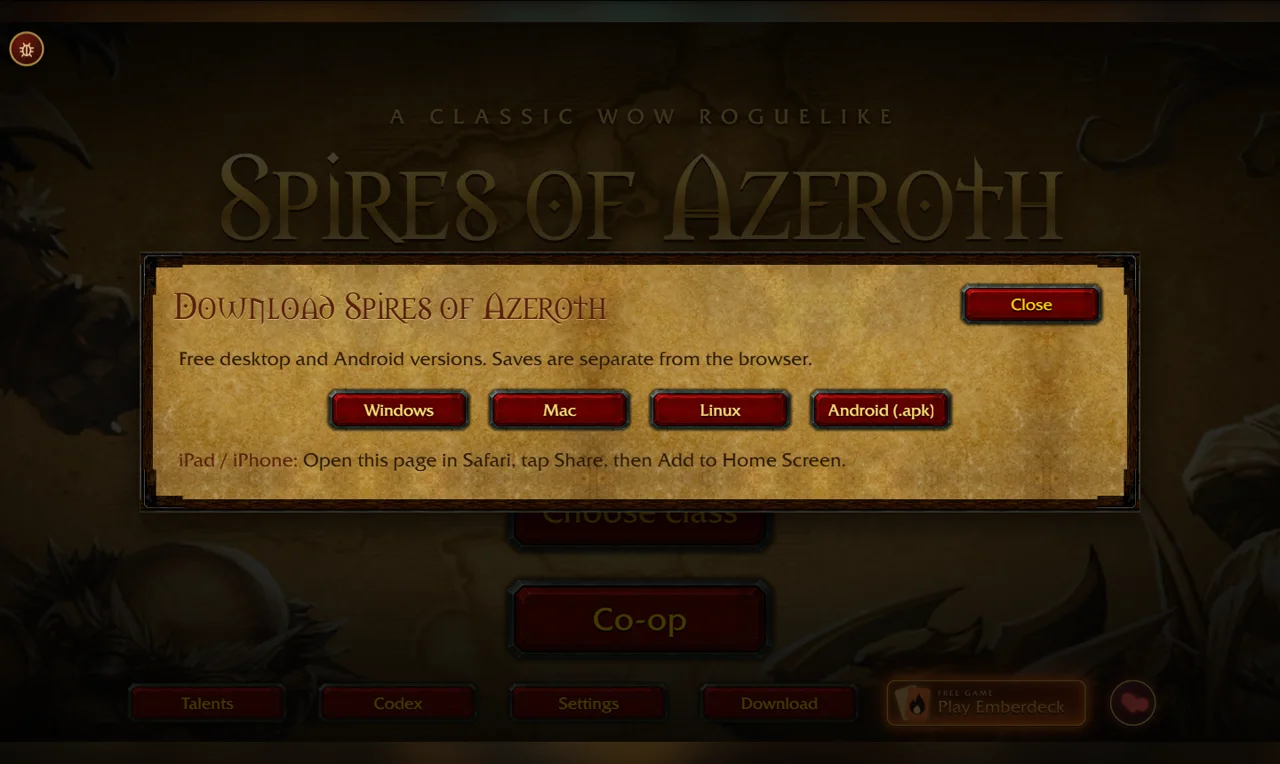
The original Download menu is useful when returning later: it links to the author's latest release rather than an unrelated mirror. The screenshot below identifies that menu; it is not evidence of successful installation.
Separate the browser build, app package and saved progress
- Identify what you already use. Write down the full host, browser profile and displayed build before changing anything.
- Back up first. Use the current game's own export controls where available; keep a copy outside the game. If the destination has progress, back that up separately too.
- Choose the destination deliberately. The author says desktop saves do not automatically carry over from the browser. A framed browser and a separate tab may also have different storage treatment.
- Check the result before abandoning the old copy. This page does not establish successful cross-version or cross-platform import compatibility.
At the 4 November check, the browser source declared 20261103e, while GitHub's latest package release was v1.0.2, published 29 October 2026. They are different version labels; a newer browser build does not prove that a downloaded package includes the same changes. [3][4]
The author says the apps fetch and cache art, models and sound from TheWoWDB on first use. Have a connection for that first launch; do not treat a small installer as proof that the complete game is bundled for offline play. [2]
iPhone and iPad: the menu's Safari route
Open TheWoWDB · original game ↗ (external website, opens in a new tab) in Safari, use Share, then Add to Home Screen, as instructed by the original Download panel. This adds a browser-based entry. It does not establish an iOS native app, touch compatibility on every device, or shared progress with your desktop browser. [1]
For reading small cards, try a landscape view or a larger screen. Our checks use browser viewport sizes; they are not physical-iPhone or iPad installation tests.
Check the name before downloading
Spires of Azeroth is this turn-based card roguelike at TheWoWDB. “Spire of Azeroth” may be a shortened search spelling. Azeroth Survivors is Aethus's separate survival game: use its own platform and source guide. Packages, class builds and saves are not interchangeable. [2]
There is also a 2012 Minecraft map called Spires of Azeroth. Its map downloads and texture packs are unrelated to this card game. Verify the author-linked GitHub repository Chrisl252/spiresofazeroth rather than choosing a file from the shared name alone. [5]
If your route does not work
If the app cannot complete its first resource load, check the author's latest release notes and the original browser entry. Report the platform, package version and exact error to the project's support channel linked from the current game or repository. A browser startup check does not prove an app will fix your device issue.
If the embedded browser window is blank, open the same original in a new tab. Preserve existing progress; do not clear storage or overwrite a save merely to test another entry. Return to the first-run steps →.
Sources & verification
- TheWoWDB · original Download panel ↗ (external website, opens in a new tab) — Captured 4 November 2026, browser BUILD 20261103e. Lists desktop/Android routes and Safari home-screen instructions; no app installation test.
- GitHub · author download notes ↗ (external website, opens in a new tab) — Read 4 November 2026: unsigned builds, separate desktop/browser saves and first-use resource fetching. Author documentation, not a compatibility or security audit.
- GitHub · v1.0.2 release ↗ (external website, opens in a new tab) — 29 October 2026; eight binary assets verified via the public release API on 4 November. Availability can change.
- TheWoWDB · version source ↗ (external website, opens in a new tab) — BUILD 20261103e at the 4 November check; separate from desktop package version.
- Planet Minecraft · lynchyinc map ↗ (external website, opens in a new tab) — 2012 map; different entity, not a download route for the card game.