
Start at the original browser game
pokesurvivor.com — original game ↗ (external website, opens in a new tab)
- Keep the same browser profile if it holds your progress.
- Start in landscape and check movement before a longer run.
- Inspect Settings → Controls; saved layouts may differ from defaults.
- Check the account and Save state before moving to another device.
The creator documents touch and controller support. That establishes available controls, not smooth performance on every phone. No physical-phone test or FPS benchmark is claimed.
[1]Which route are you choosing?
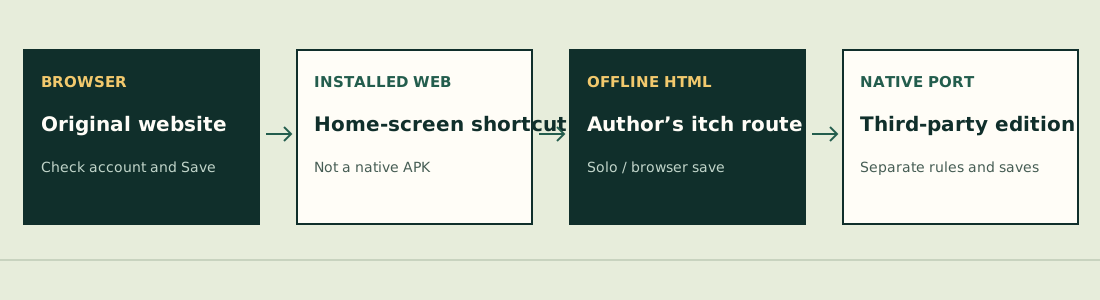
| Route | What it is | Important boundary |
|---|---|---|
| Original browser | pokesurvivor.com | Original account route; inspect Save status. |
| Installed web shortcut | Add to Home Screen / browser install | Not automatically a native APK or proof of offline support. |
| Author’s offline HTML | Author’s itch instructions: unzip and open index.html | Solo, browser saves; online route for cloud, co-op and rankings. |
| Third-party native port | JayElDragon Poke Survivors V5.1 | Separate build/rules; original account transfer not established. |
JPTER78 on itch.io — offline HTML instructions ↗ (external website, opens in a new tab) · JayElDragon GitHub — V5.1 release ↗ (external website, opens in a new tab).[2][3]
The V5.1 port release describes different Tower, fusion and Arceus rules. Do not apply its endgame rewards or run duration to the original browser game. We did not install its executables or test save migration.
Separate movement, slots and controller input
Drag to move and tap a move to make it active. Automatic attack does not mean every learned move fires at once. The creator documents stick/D-pad movement, LB/RB slot cycling and Start to pause on a connected controller. First check what your browser and Controls screen actually detect.
If only a touch region fails while menus still respond, note its position and orientation. If the clock also stops, use the general freeze checklist instead. Switching browser profiles before checking saves can hide the local copy you still have.
[1]Dated touch and installation reports
In issue #337, opened October 25, g4to12 reported the joystick stopping. Two other commenters corroborated on October 26; issue #341 is another mobile movement report. This is a cluster of reports, not a tested universal fix.
[4][5]On October 26, DrAstroLR reported a Chrome-installed web app failing to launch on HyperOS, and described opening the website and using its install action to launch the existing installation. This is one person’s workaround; it does not establish that deleting data or reinstalling is needed.
[6]Choose the next check
- Input: inspect the layout, orientation and exact unresponsive action.
- Save: preserve the newer device and read the Save result.
- Performance: record when it slows and the current settings; lower graphics is not a proven joystick fix.
- Report: include address, build, browser and symptom, not passwords.
Rules below refer to JPTER78’s source snapshot 680c3e12c670, reviewed October 26, 2026. Other hosted editions and native ports can differ. We have not completed a comparative run or verified a universal fix.
Sources & verification
- pokesurvivor.com — creator’s guide ↗ (external website, opens in a new tab) — Controls, devices and core progression, reviewed October 26, 2026. Single author source; some prose can lag the source code.
- JPTER78 on itch.io — original release ↗ (external website, opens in a new tab) — Published October 11, 2026 at 00:38 UTC. Browser game and offline-HTML instructions; downloadable package not installed in this review.
- JayElDragon GitHub — Poke Survivors V5.1 ↗ (external website, opens in a new tab) — Third-party Windows/Android port release, October 21, 2026. Different Tower/fusion/Arceus rules; not installed here.
- JPTER78 GitHub issue #337 — g4to12 ↗ (external website, opens in a new tab) — October 25, 2026 (UTC issue date). Mobile joystick stops responding; two different commenters corroborated on October 26. No universal fix verified.
- JPTER78 GitHub issue #341 — manuellucira-stack ↗ (external website, opens in a new tab) — October 25, 2026 (UTC issue date). Mobile movement failure reported while using Alakazam; one report.
- JPTER78 GitHub issue #349 — DrAstroLR ↗ (external website, opens in a new tab) — October 26, 2026 (UTC issue date). Installed Chrome web app not launching on HyperOS; one reporter describes reopening from the site’s install action.