
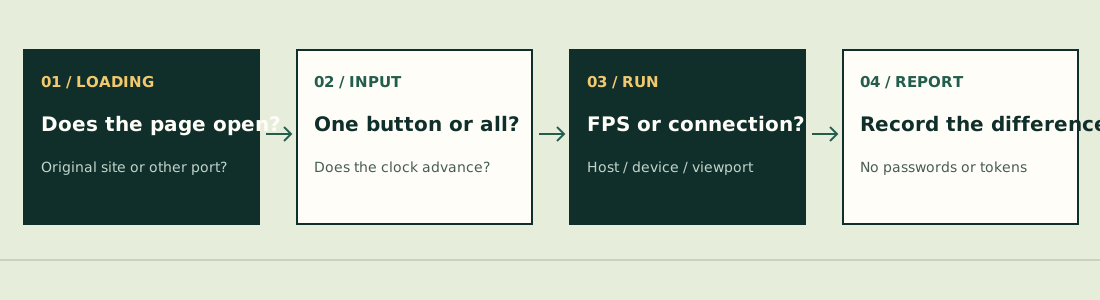
Choose the branch that matches your screen
| What you can still see/do | Next check | Use this detailed guide |
|---|---|---|
| Blank or loading screen | Try the original game in its own tab; record address and browser | Device/access route below |
| Menus work, movement fails | Check input layout/orientation and whether the clock continues | Mobile input reports |
| Grass/animation moves but clock and inputs stop | Record time, selected upgrade and exact screen; do not assume ordinary lag | Clock-freeze report below |
| Clock continues but everything is slow | Record settings, device, viewport and run stage | FPS / viewport reports below |
| Only other players lag | Record host/guest states and room stage | Co-op checks |
| Collection differs or Save fails | Keep the newer session and read Save state | Save and sync |
The original browser route is pokesurvivor.com ↗ (external website, opens in a new tab). Offline HTML and third-party native ports are different targets for a bug report.[1][2]
Dated reports from the original project
Extreme viewport: enemies appear to stop
bbbbbb123 reported enemy recycling outside the visible area at a very unusual 1587×188 window on October 26 (#350), with a source-based diagnosis. If your window is similarly extreme, return it to a conventional aspect ratio and compare what changes. This is a targeted check, not proof that all missing enemies have this cause; we did not reproduce the report.[3]
Visual animation continues, run clock stops
turbo012 reported a stopped clock and unresponsive inputs while some grass/water animation still moved on October 23 (#318). Record that distinction: moving visual effects alone do not prove the run is advancing. The report did not establish a universal repair.[4]
Low FPS when Arceus appears
DylanZM reported this on October 26 (#347). Note whether the clock continues and what happens before/after the transition. A demanding scene is a different symptom from a completely stopped simulation.[5]
Change one thing, preserve the comparison
- Note the game address, displayed version and exact stage.
- Check the game’s current graphics/control settings; change one option at a time so the comparison means something.
- If the viewport is extremely wide or short, try an ordinary shape.
- If only touch input fails, follow that symptom branch rather than assuming graphics settings repair it.
- Before any reload, inspect Save and acknowledge that an unfinished battle is not guaranteed to resume.
The creator documents settings and supported input routes, but that is not a minimum-device specification, measured FPS promise or diagnosis of your device.[6]
What to include in an actionable report
Use JPTER78’s GitHub issue tracker ↗ (external website, opens in a new tab) for the original game. Include the full game address, version, device/OS/browser, viewport or orientation, run time, selected partner/move, actions immediately before failure, and whether menus, clock, audio and visual animation still work. If relevant, identify host versus guest.
Say which checks changed the symptom and which did not. Include no passwords, cookies or account tokens. A report remaining open means its outcome was not established here; it is not evidence of a measured global failure rate.
Rules below refer to JPTER78’s source snapshot 680c3e12c670, reviewed October 26, 2026. Other hosted editions and native ports can differ. We have not completed a comparative run or verified a universal fix.
Sources & verification
- pokesurvivor.com — original game ↗ (external website, opens in a new tab) — Original entry and project identity, inspected October 26, 2026. Title screen only; no completed run.
- JPTER78 on itch.io — original release ↗ (external website, opens in a new tab) — Published October 11, 2026 at 00:38 UTC. Browser game and offline-HTML instructions; downloadable package not installed in this review.
- JPTER78 GitHub issue #350 — bbbbbb123 ↗ (external website, opens in a new tab) — October 26, 2026 (UTC issue date). Reported enemy recycling at an extreme 1587×188 viewport with source-based diagnosis; not reproduced by this guide.
- JPTER78 GitHub issue #318 — turbo012 ↗ (external website, opens in a new tab) — October 23, 2026 (UTC issue date). Reported stopped clock/inputs while some visual animation continued; cause not confirmed.
- JPTER78 GitHub issue #347 — DylanZM ↗ (external website, opens in a new tab) — October 26, 2026 (UTC issue date). Reported FPS falling when Arceus appears; no universal fix verified.
- pokesurvivor.com — creator’s guide ↗ (external website, opens in a new tab) — Controls, devices and core progression, reviewed October 26, 2026. Single author source; some prose can lag the source code.