
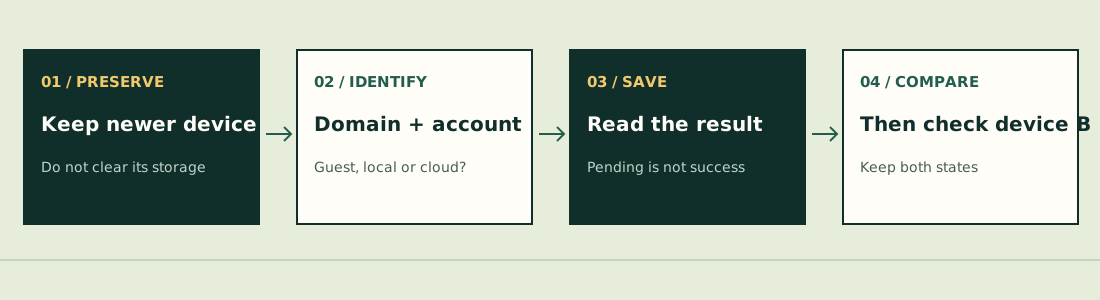
Which save state are you looking at?
| State / route | What the checked source establishes | Next useful check |
|---|---|---|
| Guest | Not a cloud account; saveNow returns a Guest failure | Do not assume changing device will carry it over. |
| Local / offline HTML | Browser-local storage, separate from cloud mode | Keep the same browser profile and game address. |
| Waiting / pending | An upload may be queued; success is not yet confirmed | Keep the session and connection; inspect the next status. |
| Offline / failed | Cloud success has not been confirmed | Restore connectivity and record the exact error. |
| Cloud success | That operation reports success | Then compare the account and collection on the other device. |
The implementation has separate modes and explicit return states; “the page still opens” does not establish that the server received the latest collection. We have not tested a live account transfer.[1][2]
A cautious order for two devices
- Identify the newer session. Note the Pokémon, upgrades and approximate balances visible there.
- Check the full domain and account. An independent hosted edition, offline copy or different browser account is not established as the same save.
- Finish the run normally where possible. Reloading is not a way to preserve an unfinished battle.
- Use Save and read the result. The checked implementation can queue a save because successful cloud writes have a minimum interval.
- Wait for actual success. Only then compare the same account on the other device. If it is still different, preserve the newer session and report both states.
The source’s minimum interval is 65 seconds. A response telling you to wait does not mean the upload completed. It also does not mean every failure is solved by waiting exactly 65 seconds.[1]
What players reported, and what it proves
On October 24, SFtittto33 reported progress not syncing between browsers in issue #327. On October 25, NapiCornio independently reported a newer phone save than the PC save in #336.[3][4]
| Report | Observed / reported action | Evidence limit |
|---|---|---|
| #327 · cross-browser | Same account appeared to show different progress | Open at review; no recovery confirmed in the available thread. |
| #336 · phone / PC | Reporter said closing the other session, finishing a run and waiting before Save led to merged progress | One person’s successful report; not a blanket fix or permission to overwrite newer data. |
These are two distinct reports, not a measured failure rate. A source-code change and a closed issue are different from a successful transfer on your own devices.
Login trouble is a separate branch
The original login screen distinguishes an account linked to Google from an account without that link. If Google was already linked, use that same Google identity through the original website. Do not assume a new account or different email can recover the old one.[5][6]
Issue #331 describes a player who could no longer use the same name/password and had never linked Google. It remained an unresolved report in the reviewed material. This guide has no access to account records and cannot promise password or collection recovery.[7]
Information to keep before asking for help
- Game address and displayed version; device, browser and browser profile.
- Whether you used Guest, local/offline or an online account.
- Last visible newer collection and the exact Save message.
- Which device is newer, and what changed before the discrepancy.
Do not send passwords, cookies or account tokens. Do not clear site data as the first check: it can remove the local copy you still need.
Rules below refer to JPTER78’s source snapshot 680c3e12c670, reviewed October 26, 2026. Other hosted editions and native ports can differ. We have not completed a comparative run or verified a universal fix.
Sources & verification
- JPTER78 GitHub — storage and cloud sync ↗ (external website, opens in a new tab) — Local/cloud/Guest branches and saveNow return states at 680c3e12c670. No account recovery or cross-device test performed.
- JPTER78 on itch.io — original release ↗ (external website, opens in a new tab) — Published October 11, 2026 at 00:38 UTC. Browser game and offline-HTML instructions; downloadable package not installed in this review.
- JPTER78 GitHub issue #327 — SFtittto33 ↗ (external website, opens in a new tab) — October 24, 2026 (UTC issue date). Cross-browser saves differ; open at review.
- JPTER78 GitHub issue #336 — NapiCornio ↗ (external website, opens in a new tab) — October 25, 2026 (UTC issue date). Different progress on phone and PC. Closed; the reporter described waiting for Save, not a universal recovery fix.
- JPTER78 GitHub — login interface ↗ (external website, opens in a new tab) — Guest/account entry and login messages at 680c3e12c670. Code does not establish a universal recovery method.
- pokesurvivor.com — original game ↗ (external website, opens in a new tab) — Original entry and project identity, inspected October 26, 2026. Title screen only; no completed run.
- JPTER78 GitHub issue #331 — hsinyichiu0314-blip ↗ (external website, opens in a new tab) — October 25, 2026 (UTC issue date). Username/password failure with no Google link; unresolved at review.