
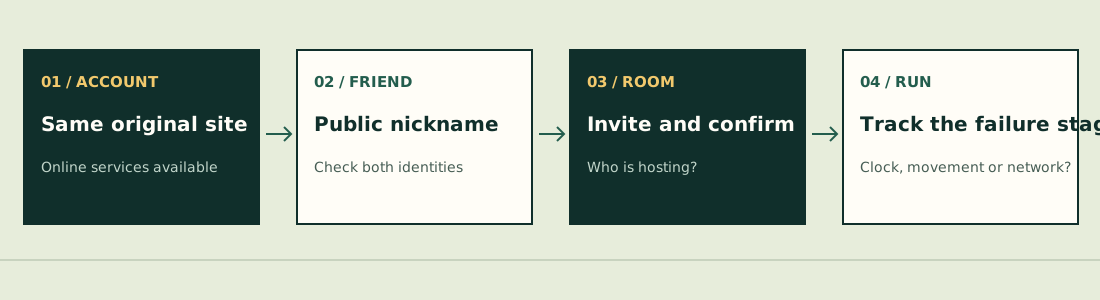
Before pressing Start
- Both players open the same original game address. A port or another hosted edition is not established as compatible.
- Check that online account services are available; Guest/offline HTML is not the same online route.
- Compare the public nickname shown in the game. Do not send passwords or assume an email address is the friend-search identifier.
- Add the friend, send the room invitation and confirm both players reached the room before the host starts.
- If one player is still on a menu, resolve that state before treating it as mid-run lag.
The creator describes up to four-player co-op, shared experience and reviving a downed teammate by standing nearby. This guide has not completed a shared match or timed a revive.[1][2]
Follow the failure stage
| Where it fails | Check first | What not to infer |
|---|---|---|
| Friend not found | Public nickname, correct account and same game domain | A matching display name in another edition is not proof it exists on this server. |
| Invitation / room entry | Both accounts online; both at the correct menu and version | Deleting an account is not a connection repair. |
| Room starts but one player stays behind | What the host and guest each see; current build | A loaded menu is not a successful shared run. |
| Lag after several minutes | Which device is host, current network and exact time/symptom | Solo performance does not establish co-op performance. |
| Host disappears | Whether the room reports disconnect/closure | Automatic host migration is not established here. |
The checked implementation makes the host authoritative for enemies, team experience and the clock; each player controls their own partner state. That division helps describe a report, but does not identify your network fault by itself.[3]
Recent original-project reports
sukyozumaru reported a friend nickname appearing nonexistent on October 25 (#333). LosMeia and KaonHew02 separately reported co-op lag on October 24 and 23 (#325/#306). These are different symptom records, not proof that all co-op is broken or that all players need the same fix.[4][5][6]
First compare game address, account readiness and version. Changing the host can be a comparison check if both players can save and return safely; it is not a verified cure. Keep notes on whether the failure follows a device, a host or a specific room.
Direct connections and server availability
The source describes peer connections and alternate network paths, but their availability depends on the current published configuration and server. Do not assume a relay is active simply because a related source file mentions it. This review did not inspect private server configuration or complete a network-failure test.[3]
A short interruption, a closed room and a lost host are different events. Preserve the displayed message and what the other player sees. Do not claim the run will survive a host exit or that it will resume after any reconnect.
A useful report has two sides
Record the host and guest devices/browsers, game addresses and versions, nicknames needed to identify the room, which menu each player reached, the time the failure began, and whether enemies, movement and the clock still update. Omit passwords, tokens and private account data.
Rules below refer to JPTER78’s source snapshot 680c3e12c670, reviewed October 26, 2026. Other hosted editions and native ports can differ. We have not completed a comparative run or verified a universal fix.
Sources & verification
- pokesurvivor.com — creator’s guide ↗ (external website, opens in a new tab) — Controls, devices and core progression, reviewed October 26, 2026. Single author source; some prose can lag the source code.
- JPTER78 GitHub — friends and rooms ↗ (external website, opens in a new tab) — Account/nickname/room flow at 680c3e12c670. Shared session not tested.
- JPTER78 GitHub — co-op state ↗ (external website, opens in a new tab) — Host authority, local players and network state at 680c3e12c670. Server relay availability is not guaranteed by this file.
- JPTER78 GitHub issue #333 — sukyozumaru ↗ (external website, opens in a new tab) — October 25, 2026 (UTC issue date). Friend nickname reported as nonexistent; one unresolved report.
- JPTER78 GitHub issue #325 — LosMeia ↗ (external website, opens in a new tab) — October 24, 2026 (UTC issue date). Co-op lag after several minutes; one report.
- JPTER78 GitHub issue #306 — KaonHew02 ↗ (external website, opens in a new tab) — October 23, 2026 (UTC issue date). Co-op lag and inconsistent movement; one report.