
A compatibility-first shortlist
| Task | Project / author | Documented requirement | Decision |
|---|---|---|---|
| Friends on different PCs | Soulstone Coop / gskolber | BepInEx 6 IL2CPP; README game 1.5.3.2 | Follow its online release and matching-version rule. |
| Several players at one PC | Soulstone-Coop / robertojun22 | BepInEx 6 IL2CPP; README tested 1.5d2 | Choose full package or plugin-only according to your folder. |
| Damage meter and live stats | BetterSoulstone / Nexus author | MelonLoader 0.7.x | Use the author’s Mods-folder instructions. |
| Old cheat/tweak controls | Soulstone Tweaks / Leyren | EA 0.11.038a; BepInEx 6 | Historical option; current compatibility unverified. |
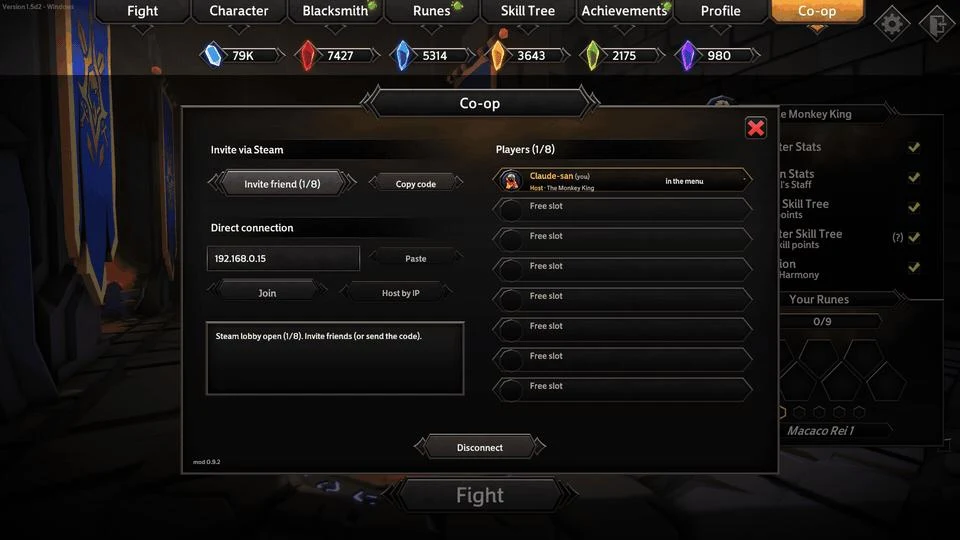
The first two rows are separate co-op implementations, despite their similar names. The screenshot illustrates gskolber’s Co-op panel only; it is not the local mod or BetterSoulstone.[1][2][3][4]
Before changing the game folder
- Record the installed game version and make a backup of saves and the current modded folder.
- Open the original author’s page. Check whether the package includes a loader or assumes one is already present.
- Install one selected project according to its own release instructions. Do not mix loader files from unrelated guides.
- Launch and verify the expected menu or HUD before adding anything else. Keep a list of the files you added.
See the co-op guide for online joining and local-controller decisions. For HUD installation, use Nexus Mods · BetterSoulstone ↗. Its author places BetterSoulstone.dll under the game’s Mods folder after MelonLoader setup.[3]
A rollback that preserves other mods
If the expected menu never appears, confirm version, loader and directory first. Revert to the recorded pre-install state before trying a different loader. When several plugins share one loader, deleting its entire folder can remove all of them. Prefer your backup over guessing which shared files belong to which package.
The old Leyren project explicitly targets an Early Access version. Its public source availability does not establish compatibility with the current game.[4]
Why a trainer is a separate check
A trainer modifies a running game through its own application; it is not a replacement for the loader named by a plugin. We have not established a comparative current-version trainer test, nor downloaded or scanned the executables. Do not interpret a provider’s “active” badge as our compatibility or safety verification. This page therefore offers loader decisions, not a tested trainer ranking.
Sources & verification
- GitHub · gskolber/Soulstone Coop ↗ (opens in a new tab) — README checked 2 November 2026. Author reports two-person Steam testing; larger groups only tested on one PC. Demo image shows mod 0.9.2, not a new playtest.
- GitHub · robertojun22/Soulstone-Coop ↗ (opens in a new tab) — Local-mod README 1.3.0; do not mix its filenames with a different release.
- Nexus Mods · BetterSoulstone ↗ (opens in a new tab) — Author description checked 2 November 2026; MelonLoader 0.7.x. Compatibility claims are the author’s, not tested here.
- GitHub · Leyren/Soulstone Tweaks ↗ (opens in a new tab) — Author targets Early Access 0.11.038a on Windows; current-game compatibility unverified.