
Which route fits your group?
| Your setup | Route | Check before installing |
|---|---|---|
| Separate Windows PCs | gskolber online mod | README targets game 1.5.3.2; everyone needs the same mod version. |
| One Windows PC | robertojun22 local mod | README tested game 1.5d2; each extra player needs a controller. |
| Console, Mac or Linux | No supported mod route established here | Do not apply Windows loader instructions to another platform. |
The online author advertises up to eight players but reports real Steam testing with two; larger groups were tested only on one PC. Treat the capacity as an experimental limit, not eight-player stability evidence.[2][3]
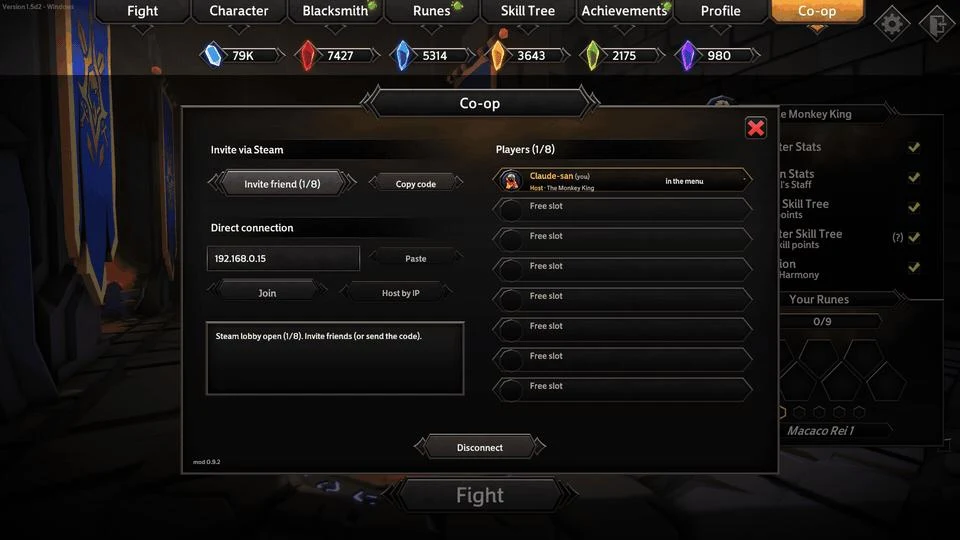
Online: install, invite, then start
Use the GitHub · author’s Releases ↗ alongside these checks. The page is an external download destination, not our mirror.
- Close the game. Back up your saves and note any loader already installed. Match the release instructions to your game version.
- In Steam, open Manage → Browse local files. Extract the author’s package so winhttp.dll and BepInEx sit beside Soulstone Survivors.exe.
- Start through Steam and allow initial loader preparation. A Co-op tab indicates that the plugin loaded.
- Host sends a Steam invite; guest accepts. If that fails, use the author’s invite-code route. Host chooses the map and starts Fight.
The README distinguishes Steam relay invitations from direct IP. Start with Steam invitations rather than changing router settings for an unrelated connection method.[2]
Same PC: controllers and package choice
The local author’s README 1.3.0 distinguishes a full “completo” package from a mod-only package for an existing BepInEx installation. Do not stack two full packages. Close the game, extract the selected package into its folder and connect one controller per extra player; one keyboard/mouse counts as one player. First launch prepares libraries and can appear frozen for 1–3 minutes.[3]
Open the author’s GitHub · local-mod instructions ↗ for the controls belonging to the downloaded version. This guide does not turn a local mod into online play.
Before trusting a long run
Online rejoining does not preserve a run by default; Crusade is unsupported, and leaving as host ends the group’s run. The author also notes missing partner aura/channel visuals. An absent effect on the guest’s screen is not enough to diagnose lost damage.[2]
For rollback, remove only the files installed by that package, following its uninstall list. If a loader was already shared with another plugin, restore your pre-install folder instead of deleting that shared loader blindly. We have not installed either mod or verified saves, achievements or long-session stability.
Sources & verification
- Steam · Game Smithing ↗ (opens in a new tab) — Store checked 2 November 2026; product facts, not a build benchmark.
- GitHub · gskolber/Soulstone Coop ↗ (opens in a new tab) — README checked 2 November 2026. Author reports two-person Steam testing; larger groups only tested on one PC. Demo image shows mod 0.9.2, not a new playtest.
- GitHub · robertojun22/Soulstone-Coop ↗ (opens in a new tab) — Local-mod README 1.3.0; do not mix its filenames with a different release.