
Match the message before changing files
| Message or stage | Check next | Evidence boundary |
|---|---|---|
| Missing or wrong client files | 1.12.1 build 5875 enUS and a dedicated folder | A different language or modern client needs its own compatibility evidence. |
| Database could not start / MariaDB setup failed | Read the database checks below and preserve the log | One generic database message can have several causes. |
| An update stopped | Record the last completed stage, then use the update section | The screenshot below is an older 0.5.2 update report. |
| Long monster-path stage | Check whether paths are downloading or being built locally | The author documents a CPU-intensive local fallback. |
| Wine missing DLL / temporary-file error | Read the Mac/Wine scope | Community report on a specific Apple Silicon setup; official Mac support remains absent. |
Our review checked the public issue text and replies on 5 November 2026. We have not reproduced these failures on an installed client. The goal is a useful next check and an attributable report, with your existing data preserved.
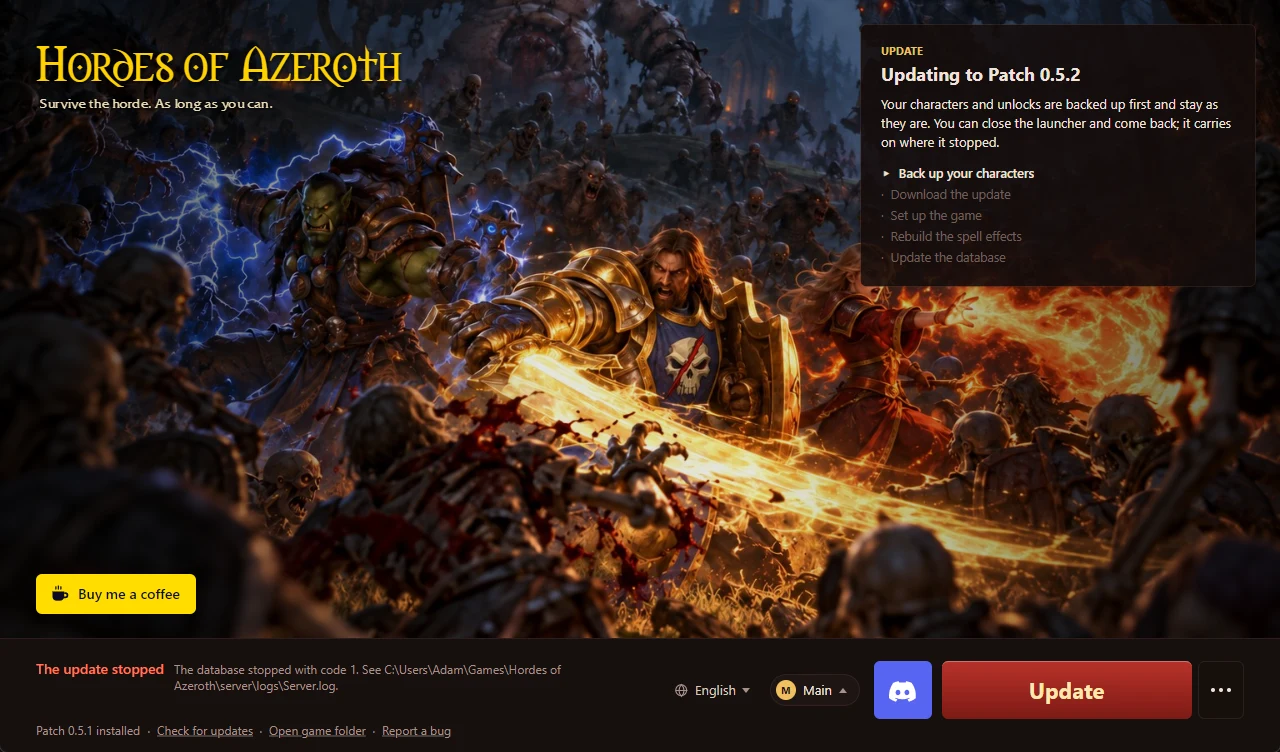
Database startup has more than one reported cause
- Close the game and launcher normally. Record the version, installation folder and exact error first. Preserve existing characters and backups.
- Check that this is the dedicated client folder described by the author, with the correct base files. A launcher that reaches a database stage has not necessarily completed every installation stage.
- If this followed a failed update, a normal Windows restart is one reported reversible step. In issue #11, devzspy reported that restarting restored the installation. Another commenter suspected port 3306, while the reporter said no competing service was found. Keep both reports when interpreting the symptom. [2]
- If it still fails, save the launcher's log ZIP and report the exact stage. A developer said later patches would handle an occupied port and a stale database port more carefully; that reply is a versioned statement, rather than proof that every current failure has the same cause. [2]
In the launch discussion, Kiritsuwu reported success after moving the installation to another drive. h0gg1e later reported that a drive change did not solve their database installation. These are two distinct users, with one positive and one negative report for that action. Use their reports as diagnostic context, rather than a success guarantee. [3]
Keep database files and backups while diagnosing an existing installation. Before any repair that replaces data, use the project's own support channel to establish which data it will affect.
Separate a slow update from a stopped update
If data is still downloading, note the stage and allow the operation to finish. In issue #12, abing119 reported slow downloads and later said speeds improved after a commenter pointed to an added alternate source. The exact current source-selection UI was not verified here, so use the author's launcher/release notes for today's options. [4]
If the launcher says the update stopped, record the version and message before retrying from the author-supplied launcher. Avoid combining files from someone else's installation. Issue #28 describes a 0.6.1 → 0.6.2 update failure and a 60-second database timeout even after copied files were tried; its public report supplies a symptom, with no confirmed universal repair. [5]
For old character-creation failures, the author marked issue #19 fixed in 0.6.2. A separate font error on speaking to the run master was marked fixed in 0.6.2 Hotfix 1 in issue #22. Keep each error and patch separate when checking your version. [6][7]
Mac / Wine has a bounded community report
The Hordes author currently lists Mac as unsupported. kalupsi's public report describes one Apple Silicon Mac using a Sikarugir Wine 10.0 engine via Highball. It identifies three distinct symptoms. [1][8]
- Database setup cannot write to mysqld's stdin.
- The database process cannot start because ICU DLLs are missing.
- InnoDB cannot create a temporary file, while the launcher rewrites its database configuration.
The author of that community report says the separate parts worked, but the combined script had not been run as one script. Its approach involves database files, Wine libraries and rebuilding the launcher. Read GitHub · kalupsi’s community project ↗ with that scope in mind. This guide does not provide an audited or reproduced script-execution recipe. The cross-posts to two subreddits represent one reporter. [8]
Give the project enough information to distinguish the failure
- Write down the launcher/game patch, OS and client build/language.
- State whether this is a first install, an update, or a previously working installation.
- Include the exact error and the last visible installation stage.
- Use the launcher's Report a bug or its ⋯ → Save logs to the desktop entry. Review the ZIP before sharing it with project support. [1]
- Describe each attempted change and its result, including a failed workaround.
GitHub · Hordes issue tracker ↗ · Discord · author-linked community ↗. This website does not upload your logs or provide a save-recovery service.
GetBillingPlan errors and the crash reference 590D4D6E still lack a confirmed solution in the material checked for this guide. A matching label alone is insufficient to apply another report's repair.
Sources & verification
- GitHub · Hordes author README ↗ — Installation, monster paths and log-export instructions, checked 5 November 2026.
- GitHub · devzspy installation report ↗ — 1 November; reporter says restart helped. Port explanation and planned launcher handling are attributed comments.
- Reddit · launch discussion ↗ — Kiritsuwu reports a drive change helped; h0gg1e reports it failed. Version/date context is limited by relative timestamps.
- GitHub · slow updater report ↗ — 1–2 November replies; abing119 reports improvement after alternate-source discussion.
- GitHub · update/database-timeout report ↗ — Opened 3 November; no verified repair recorded in the material reviewed.
- GitHub · character-creation report ↗ — Author marks fixed in 0.6.2; source claim, not our reproduction.
- GitHub · run-master font error ↗ — Author marks fixed in 0.6.2 Hotfix 1; separate symptom.
- Reddit · kalupsi Mac/Wine report ↗ — 4 November post; one author and one configuration, combined script not run end-to-end.