
Start with the session you want
| Your situation | First route to check | Why it fits |
|---|---|---|
| You want to try a browser session | Aethus’s original entrance | Check WebGPU/device access, then the game’s own first load. |
| You already have the required 1.12.1 files | Hordes client requirements | Prepare its dedicated installation and local server. |
| You want to play Hordes with friends | Current Hordes README, regular characters | Up to four players are documented; v0.6.4 Hardcore remains excluded. |
| You are using a phone | Azeroth Survivors device checks | Hordes has no verified native phone release here. Switching games means a separate ruleset and progress. |
Players explicitly asked how these projects compare in the Hordes release discussion and an Azeroth Survivors download thread. Their preferences help identify these choices; they do not establish which game has better damage, balance or performance on today's builds. [3][4]
Separate the two installation jobs
Hordes uses jonhaldors's launcher alongside your own enUS 1.12.1 build 5875 files. Its local server, database and client are managed through that launcher. Use the source and folder checks before preparing the installation. Windows 10/11 64-bit is listed; Linux and Steam Deck are beta. Mac remains unsupported in the author documentation. [1]
Azeroth Survivors starts at Aethus · original host ↗, with a browser route and a creator-linked Windows download. Use its own download/platform guide for the archive and attributed Deck reports. A Hordes installation cannot resolve an Aethus WebGPU message in the same game session. [2]
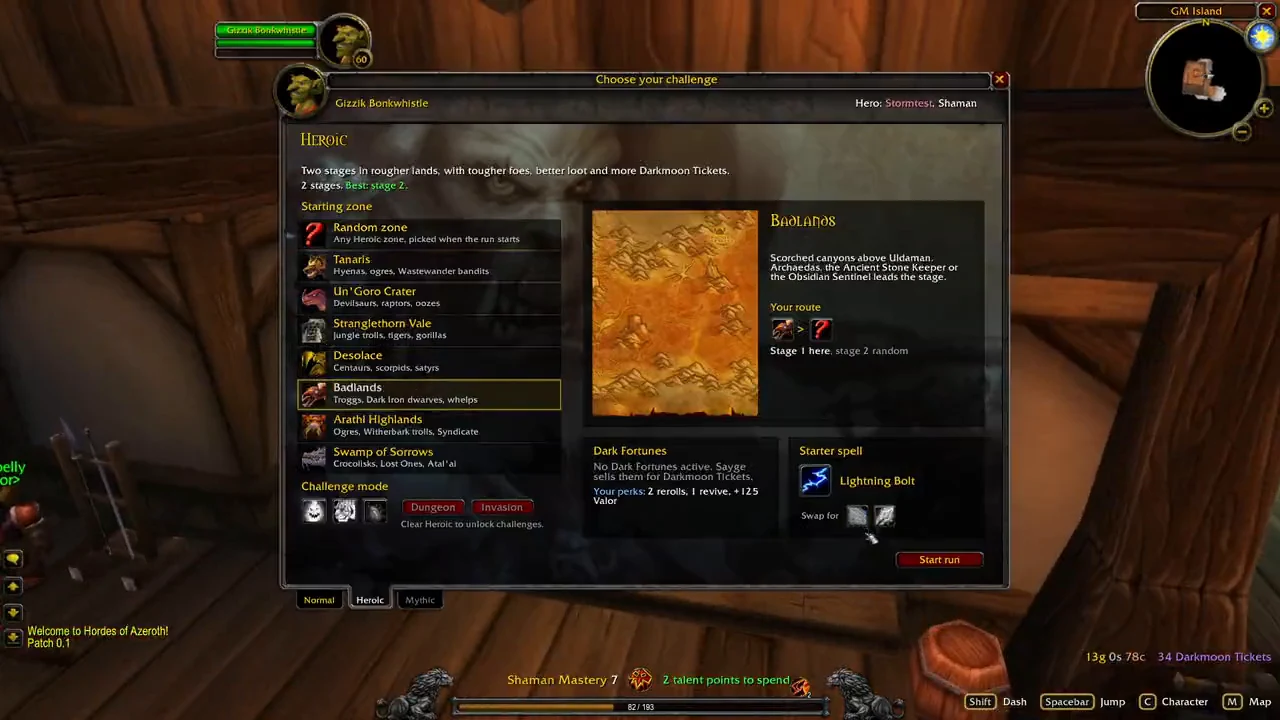
The image here identifies Hordes's local run-selection interface from the author's early video. Compare its actual project identity before applying a similarly named build or save tutorial. The recording predates today's co-op documentation.
Check the current party rule
Hordes's current README describes a host, a game browser or join code, and up to four players. The host runs the game on their PC. v0.6.4 excludes Hardcore characters from co-op. Those conditions replace the old solo-only answer for current regular-character sessions. [1][5]
Aethus's project has its own host/join and lobby guide. Use that flow for an Azeroth Survivors party. A shared Warcraft class name does not create a cross-project lobby, and this page does not establish cross-project character transfer.
Keep game progress and build plans with their project
- Identify the active game and host. Write down its source address, displayed version and installation folder before moving files.
- Keep an independent backup. Hordes documents local database progress and automatic update backups under
HordesOfAzeroth/backups, retaining the three newest. Preserve a copy before experimenting with another installation. [1] - Use Aethus's own export route for its game. Follow the original-game backup order and keep source and destination exports separately.
- Match the guide to the ruleset. Megabonk.org's Azeroth talent planner and ASBuilder guide address Aethus's game. They provide no verified Hordes save converter or Hordes talent allocation.
For a quick trial, first resolve browser/device access. For local Hordes play, first resolve client ownership, file requirements and installation. These decisions can be made from the documented entry routes without inventing a universal winner.
Sources & verification
- GitHub · Hordes author README ↗ — Current regular co-op, platforms and backup documentation, pinned revision cfc02ac; checked 5 November 2026.
- Aethus · Azeroth Survivors original ↗ — Existing source/menu review retained in the linked original-game guides. This comparison adds no new installed-client or device test.
- Reddit · Hordes launch discussion ↗ — TomasMichele69 asks how the games compare. Early player impressions are dated anecdotes.
- Reddit · alternative-download discussion ↗ — Hordes recommendation and comparison follow-ups dated 25–29 October. Most other comments concern Aethus and remain scoped to it.
- GitHub · v0.6.4 changes ↗ — Hardcore currently excludes co-op. Current docs supersede older solo-only descriptions.
- GitHub · jonhaldors gameplay recording ↗ — Author recording labelled version 0.1, frame at 00:05. Inspected 5 November 2026; historical run-selection UI, not proof of current balance or co-op.