
Which kind of mod do you need?
| Goal | Route | First compatibility check |
|---|---|---|
| HUD, spell meter or build priorities | Original-client addons → | Author ZIP/folder instructions and declared game version. |
| Higher-resolution models or textures | HD Overhaul | Windows game folder and the exact WoW asset build named by the recipe. |
| Community co-op setup | Together | Its separate installer, launch command and release notes. |
| Build and change a local client | Community reconstruction | Repository toolchain and user-supplied data requirements. |
| Change progress or look for cheats | Save editing and cheats → | Exact tool/client compatibility and an unchanged backup. |
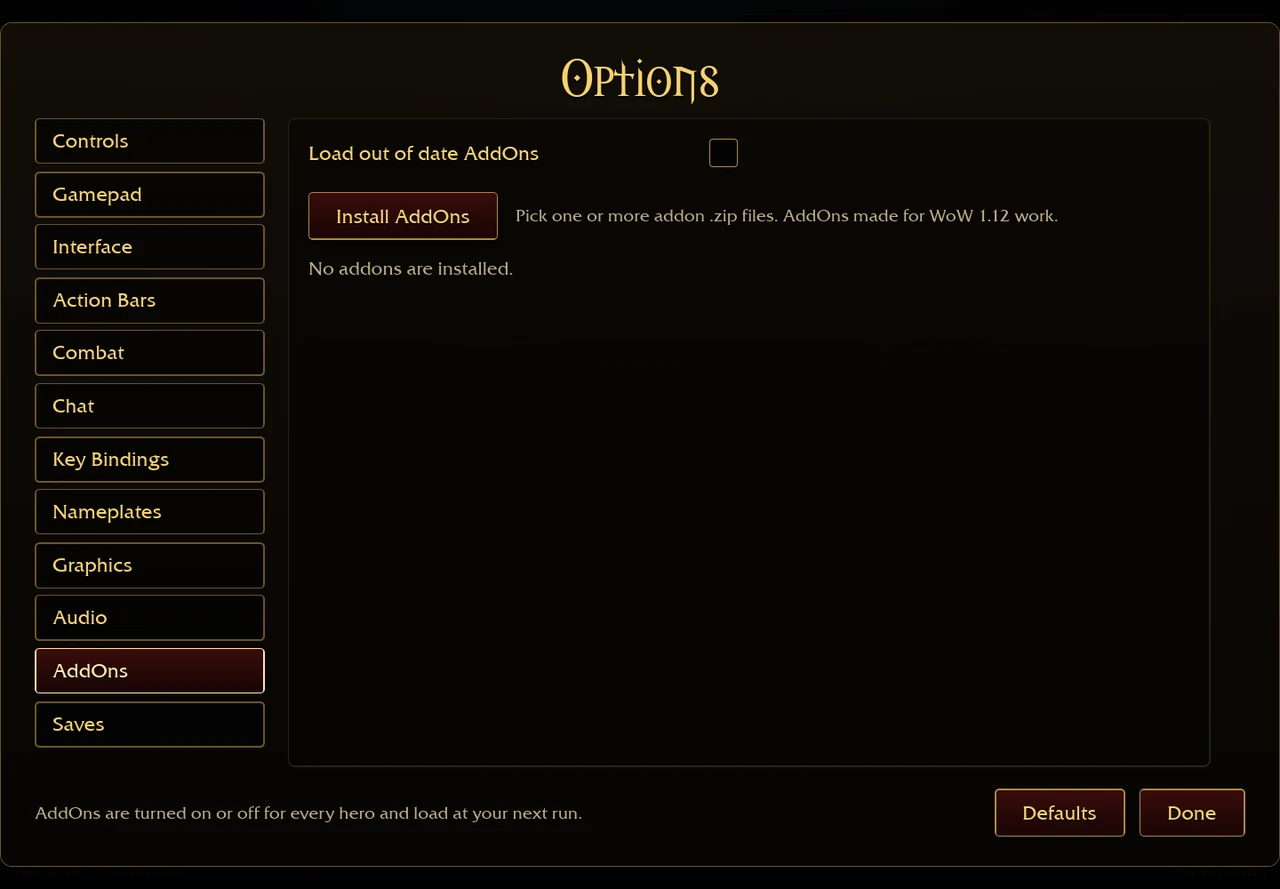
The original menu screenshot below shows the AddOns installation route. It does not show HD Overhaul or Together running. [1]
Original-client addons: keep the browser and desktop paths separate
The browser accepts addon ZIPs through Options → AddOns → Install AddOns. Desktop users locate the folder through Open AddOns Folder and follow the author’s nesting requirements. An addon changes only what its own code and the client API support. [2]
Follow browser ZIP or desktop folder setup → · Plan a loadout with ASBuilder → · Compare damage-meter views →
HD Overhaul: Windows files and your own asset source
finalpantasy’s README describes optional conversions for models, equipment, world assets and spell effects, alongside new content and a transactional installer. Its requirements name Windows 10/11, Python 3 and a Windows Azeroth Survivors folder. The documented game test target is v0.103.x. That target is older than later original-client references on this site. [3]
HD packages require your own World of Warcraft install and the build named by the recipe. The repository says it distributes code and recipes, with no game executable or Blizzard assets. Its installer documents planning, verified backups, receipts and rollback. These are author-described features; this guide has not run the converters or verified restoration. [3]
- Identify the Windows game version and make a separate backup of the game folder and exported progress.
- Read the chosen package’s recipe and identify the required asset build and reader dependency.
- Inspect the installer plan and backup requirements in the author documentation before applying a package.
- Retain the receipt and original files. Check the author’s rollback procedure before replacing further packages.
GitHub · Overhaul requirements and tools ↗ (external website, opens in a new tab)
Together: choose its separate launcher deliberately
bymarvin’s Together repository documents a co-op installer/updater and launches through Start-Coop.cmd. It links a source repository for the DLL, network helper and updater. Its README describes signed releases, file checks, backups and rollback. This guide has not audited those mechanisms or joined a co-op session. [4]
The original client’s Co-op menu and Together’s launcher are different setup paths. Follow the documentation for the client you actually selected. A separate folder or successful launch does not prove that saves, addons or multiplayer sessions transfer between them. Read the original-client co-op scope →[4]
GitHub · Together setup and releases ↗ (external website, opens in a new tab)
Community rebuilds: a repository is a separate version
OutThisLife’s repository describes a local from-source build using a Rust/Bevy client engine and points back to Aethus’s original game. Read its toolchain, data preparation and build instructions as a separate project. A guide for that code snapshot does not establish current original-client mechanics or addon compatibility. [5]
GitHub · community rebuild requirements ↗ (external website, opens in a new tab)
Before changing a client or package
- Record the project author, release/tag, game version, platform and original game address.
- Export progress from the client and browser where it exists. Export the destination too before any import.
- Keep addon settings and a clean game folder separately where the project requires them.
- Change one package first, using the author’s installation method. Check menus and character progress before retaining the change.
- If a package fails, preserve the original and the release details. Follow its documented removal or rollback path.
Browser addon storage belongs to its browser and origin. A save import is not an addon transfer. The game validates imported save text and replacement can discard destination progress. [2][6]
Can I install these mods in the browser?
The original browser addon installer accepts supported addon ZIPs. The Overhaul workflow described above targets Windows game files. Together supplies a separate native launcher. Their requirements cannot be substituted for each other. [2][3][4]
Does a mod unlock everything? Each project needs its own documented feature and version evidence. For tools that edit progress, read the editor and import boundaries →. No current-client cheat table or all-unlocked save has been validated here.
Sources & verification
- Aethus · original game ↗ (external website, opens in a new tab) — Original v0.127.0 / d1c85453 public client text inspected 29 October 2026. Single-source menu and talent evidence; no completed run or damage benchmark.
- Aethus · browser addon installer ↗ (external website, opens in a new tab) — Inspected 29 October 2026. ZIP handling, per-browser IndexedDB files and next-run loading. Not proof every addon is compatible.
- GitHub · finalpantasy · Overhaul ↗ (external website, opens in a new tab) — Author documentation read 5 November 2026. README describes Windows 10/11, Python 3, a game v0.103.x test target and user-supplied WoW assets for HD packages. Screenshots are author automated preview builds. No executable, addon installation, multiplayer session or save migration tested here.
- GitHub · bymarvin · Together ↗ (external website, opens in a new tab) — Author documentation read 5 November 2026. README documents a separate co-op installer/updater, Start-Coop.cmd and a linked source repository. Signed-update and rollback statements are author claims. No executable, addon installation, multiplayer session or save migration tested here.
- GitHub · OutThisLife · community rebuild ↗ (external website, opens in a new tab) — Author documentation read 5 November 2026. README identifies a community local from-source build on Rust/Bevy and directs players to Aethus for the original. This repository does not establish the original author’s development methods. No executable, addon installation, multiplayer session or save migration tested here.
- Aethus · browser save bridge ↗ (external website, opens in a new tab) — Inspected 29 October 2026. File export and file selection; the client itself validates imports. Not a save-recovery test.